
Appearance
Advanced Features
Once you've mastered the basics, explore these advanced features to get the most out of SnapPoint.
Snap Whole Page
Summarize an entire page without selecting any text. This is ideal for long articles, documentation, or any page where you want the big picture instead of a single block.
- Header button: Click the full-screen icon in the side panel header. A dropdown lets you choose Auto (smart agent routing) or a specific sub-agent.
- Empty-state button: When the side panel is empty, click the Snap whole page button to start a whole-page summary with Auto routing.
- Token-friendly: Whole-page snaps skip image-to-base64 conversion, so only the page text is sent to the model.
INFO
Whole-page snaps work on regular web pages. Browser-internal pages (e.g., chrome://, the Web Store) are not supported.
Global Prompt Template
By default, SnapPoint uses the Global Prompt Template for all summarization tasks. You can customize this template to set your preferred tone and format.
User-defined variables like {{targetLang}}, {{siteName}}, {{hostname}}, and {{author}} are supported to keep your summaries contextually relevant and consistent.
If you enable Sub-Agents or Context-based Rules (see below), they will take precedence over this global template.
Image Analysis (Vision)
SnapPoint can analyze images and explain their content. This is useful for summarizing infographics, diagrams, or visual data.
Default Status
This feature is disabled by default to save tokens and processing power. You must manually enable it in settings.
- Embedded Images: For images within articles, SnapPoint converts the visual content into a text description and integrates it with the surrounding text for cohesive analysis.
- Single Image Snippets: If you snap only an image (without surrounding text), the AI will focus exclusively on analyzing and describing that specific visual content.
- Enable: Toggle Enable Image Analysis in Settings → General Settings.
- Requirement: Use a model that supports vision (e.g., Qwen3.5 2B/4B/9B models).
Agents & Rules
SnapPoint uses a two-tier system to determine how to summarize content: Context-based Rules (precise) and Sub-Agents (AI-driven routing).
Note on Activation
By default, both Sub-Agents and Context-based Rules are disabled to keep the initial experience simple. You must manually enable them using the master switches in Settings → Prompt Settings.
Sub-Agents (Smart Router)
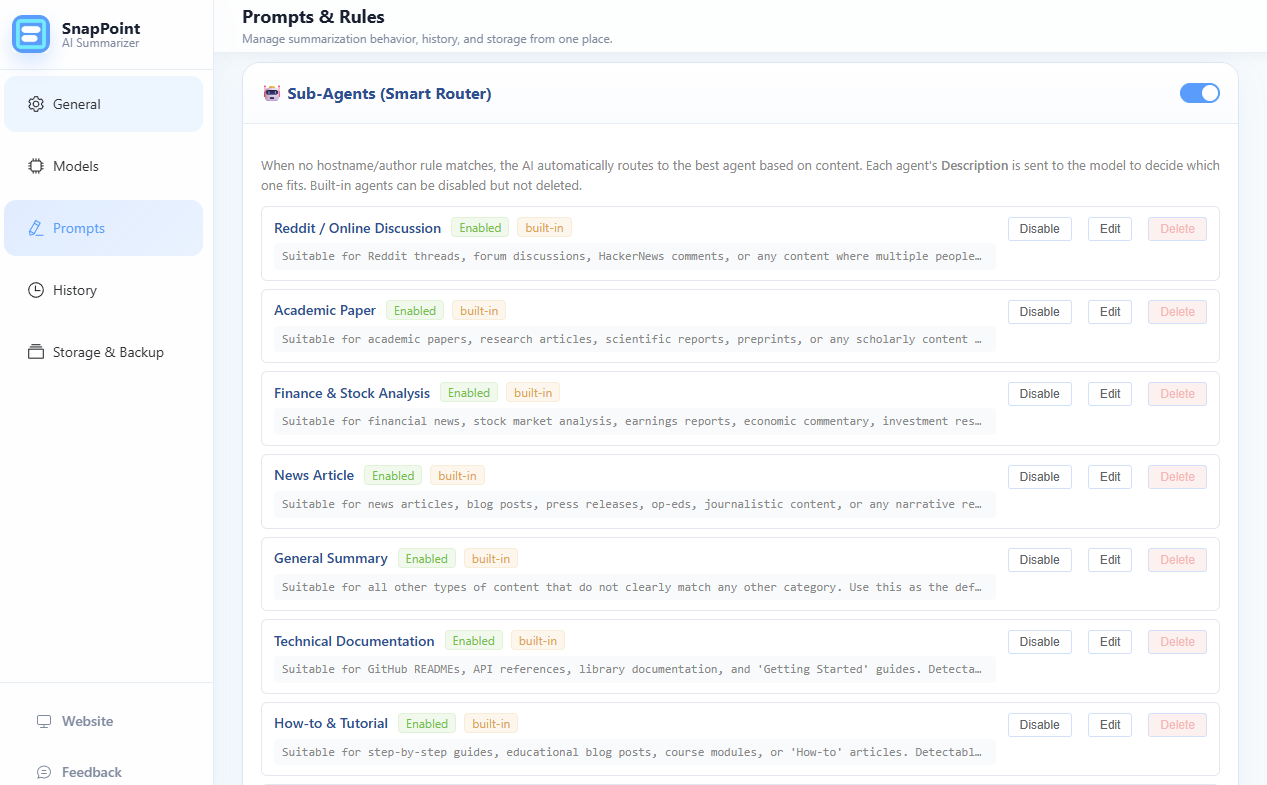
When no specific rule matches, the AI automatically routes to the best agent based on the content type. This is managed in Settings → Prompt Settings.
- How it works: Each agent has a Description. This description is sent to a "Router LLM" which decides which agent fits the current page best.
- Built-in Agents: SnapPoint comes with specialized agents:
| Agent Name | Primary Focus | Best Use Cases |
|---|---|---|
| Paper Agent | Methodology, core innovations, and limitations. | arXiv, scholarly journals, preprints. |
| Forum Agent | Thread structure, consensus, and key arguments. | Reddit, Hacker News, GitHub discussions. |
| News Agent | Facts, context, and future implications. | News articles, press releases, blog posts. |
| Repo Agent | Goals, stack, and architectural overview. | GitHub repositories, landing pages. |
| Technical Documentation | Installation, usage, and API specifications. | API docs, lib READMEs, technical guides. |
| How-to & Tutorial | Prerequisites, execution steps, and takeaways. | Educational posts, course modules. |
| Product Review | Pros/cons, value prop, and performance verdict. | Tech blogs, e-commerce product reviews. |
| Legal & Policy | Terms, user obligations, and privacy details. | Terms of Service, Privacy Policies. |
- Custom Agents: You can add your own sub-agents by providing a name, a description for the router, and a custom prompt template.
Context-based Prompt Rules
Rules allow you to define exact behavior for specific websites or authors. They are evaluated from top-to-bottom, and the first match overrides everything else.
- Hostname Pattern: Match specific sites (e.g.,
github.comorwikipedia.org). - Author Pattern: Match specific content authors if detectable on the page.
- AND Logic: You can combine both hostname and author for highly specific targeting.
- Templates: Define a unique prompt for these matches (e.g., "Always summarize GitHub issues as technical bug reports").
Export Summary as Image
Share your summary as a polished image — perfect for posting to chat apps, social media, or saving as a visual note.
- How to use: After a summary finishes, click the image icon in the side panel footer (next to the Copy button). The summary is rendered as a styled share card and downloaded as a PNG file.
- Share card layout: The exported image includes the page title, source URL, the full summary (with formatted code blocks, tables, and math), and a SnapPoint watermark with the date.
- Consistent look: The card always uses a fixed light theme, so exported images look the same regardless of your browser's dark/light mode.
- Local only: The image is generated entirely in your browser and saved to your Downloads folder. Nothing is uploaded anywhere.
INFO
The download may take a few seconds to appear in your browser's download list depending on your system. The image is fully generated before the download starts.
Knowledge History
Every summary is automatically saved to your local history for later review and search.
- Browse history: Click the History tab in the side panel to see past summaries.
- Search: Use the search bar to find past summaries by keyword, URL, or content type.
- Storage: Export your history as a JSON file or clear entries in Settings → Storage.
TIP
History is stored entirely in your browser's local extension storage. It is never synced to a server.
Configuration Backup & Restore
Migrate your setup between browsers or devices, or keep a backup before a factory reset.
- Backup to File: In Settings → Storage → Configuration Backup, download all settings as a JSON file. This includes AI model endpoints, prompt templates, context rules, and sub-agents (including custom ones).
- Restore from File: Import a previously saved backup to restore all settings. The extension reloads automatically after import.
- Factory Reset: Restore all settings to their defaults. Your summary history is NOT affected.
WARNING
Importing a backup overwrites the corresponding settings and reloads the extension. Any in-progress summaries will be interrupted.
Next Steps
- Snap Button Guide: Learn how to master the Snap Button and keyboard shortcuts.
- Frequently Asked Questions (FAQ): Common issues and solutions.